
Creating a German Grammar Learning Experience
Can I engage learners through stories and a probability over accuracy mindset

A story-based German grammar experience designed to help adult learners identify and apply core structures in meaningful communication.
Audience
Adult learners at Lower intermediate+ in German (A2–B1+)
Responsibility
End to end instructional design and development (analysis, action mapping, storyboarding, visual design, prototyping, user testing)
Tools Used
Figma, Figma Make, Chat GPT, Affinity Design, Canva

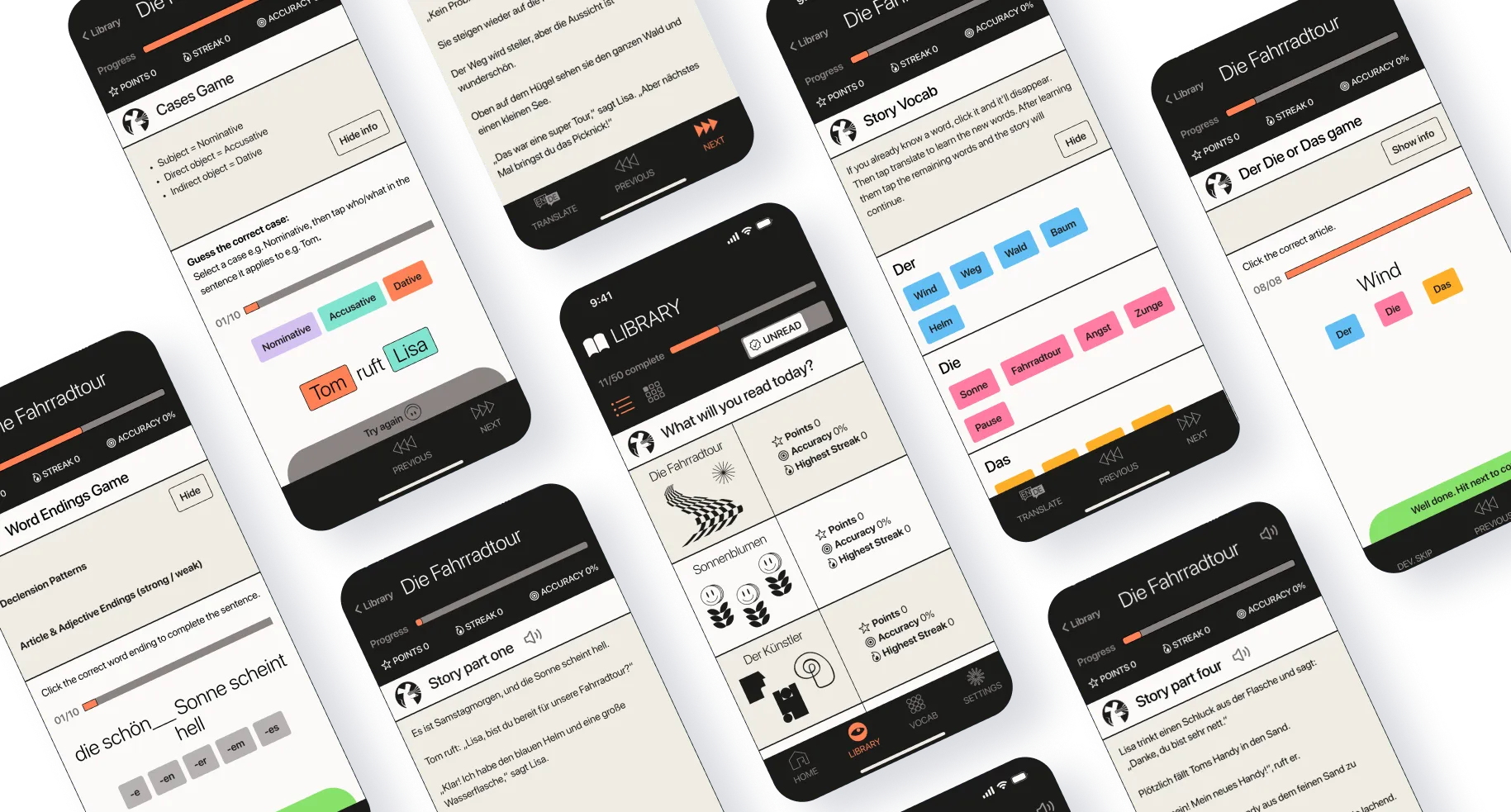
Overview
The problem

Many adult learners plateau because grammar rules feel abstract and disconnected from real use. They lack the grammar knowledge to form new sentences independently—particularly challenging concepts like noun genders, cases, and declensions.
How can I demonstrate the benefits of learning grammar and how can it improve real-world communication?
The Solution

Laserrat is a story-based learning flow that introduces grammar in progressively challenging contexts.
Rather than presenting grammar as isolated rules, the app introduces structures within meaningful narrative contexts, enabling learners to apply patterns immediately. The design leverages prior linguistic knowledge, supports autonomous pacing, and reduces cognitive overload through structured repetition and clear progress signals.
My Process

My Approach
Given the constraints of low budget and limited availability of the SME, I decide to use the fast, iterative model of SAM (Successive Approximation Model). Throughout the project I could drew on my eight years of language teaching and my own German learning experience.
Research
I interviewed learners to form a learner needs analysis and engaged the help of certified German language teacher Lotta Schneidemesser as a Subject Matter Expert (SME) to help with action mapping and storyboarding.
Laserrat was designed as a mobile app with 15-minute story lessons, reflecting research showing that adult learners need flexible, familiar formats that fit around work and family schedules.
Design and Development
After storyboarding, I rapidly prototyped interactive versions using AI-assisted coding to quickly validate the learning approach and gather user feedback.
Research
Existing Solutions Analysis
I investigated a range of German learning resources like germanwithlaura.com who champions grammar learning and has great condensed grammar tables, Der Die Das rules book that helps recognise common patterns of noun genders and my testers' favourite learning app Duolingo.
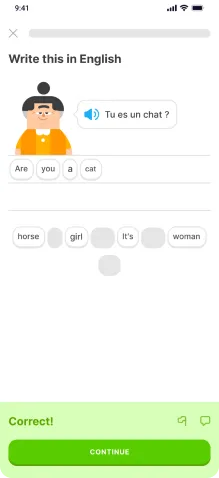
Duolingo lesson
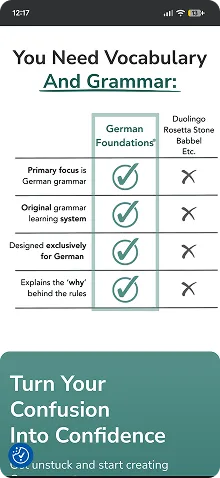
Learn With Laura
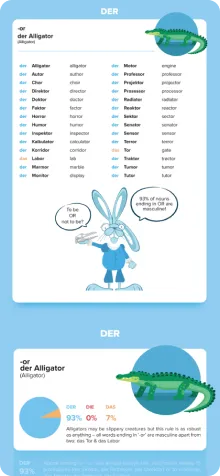
Der Die Das rules book
I formed a list of key findings to help draw from the best parts and avoid the worst:
Things to use
* Short 15-20 minute lessons
* Progress tracking
* Gamification: tracking stats, points, streaks etc.
* Clean, colourful and cheerful UI
* Probability over accuracy using shortcuts and patterns
* Short stories for context and lesson structure
* Colour coding genders for chunking and retention
Things to avoid
* Uninspiring, dry, copywriting and content
* Overly pushy notifications and guilt tripping
* Pay walls preventing habit forming
* Too many features and settings
* Lack of clear goals/unending content
* Unusual, unnatural speech
* Lack of language in context/ no memory recall
Action Mapping
Together with the SME we created an action map for the demo story to ensure that all actions align with achieving the main goal:
Performance Goal
Enable adult German learners to accurately apply core grammar structures in real communicative contexts, reducing hesitation and increasing confidence in independent sentence production.
Observable Actions Learners Must Demonstrate
Learning Strategy (Story-Based Application)
Phase 1 - Context & Meaning
* Engage with a short narrative grounded in realistic adult scenarios
* Identify unfamiliar vocabulary and infer meaning from context
Phase 2 - Pattern Recognition
* Analyse how noun gender and case function within the story
* Detect recurring grammatical patterns embedded in meaningful sentences
Phase 3 - Guided Application
* Apply gender and case rules directly within story-based sentences
* Select correct declensions based on sentence role and meaning
I mapped out a story flow to understand what needs to be built.

Design & Development
Storyboarding
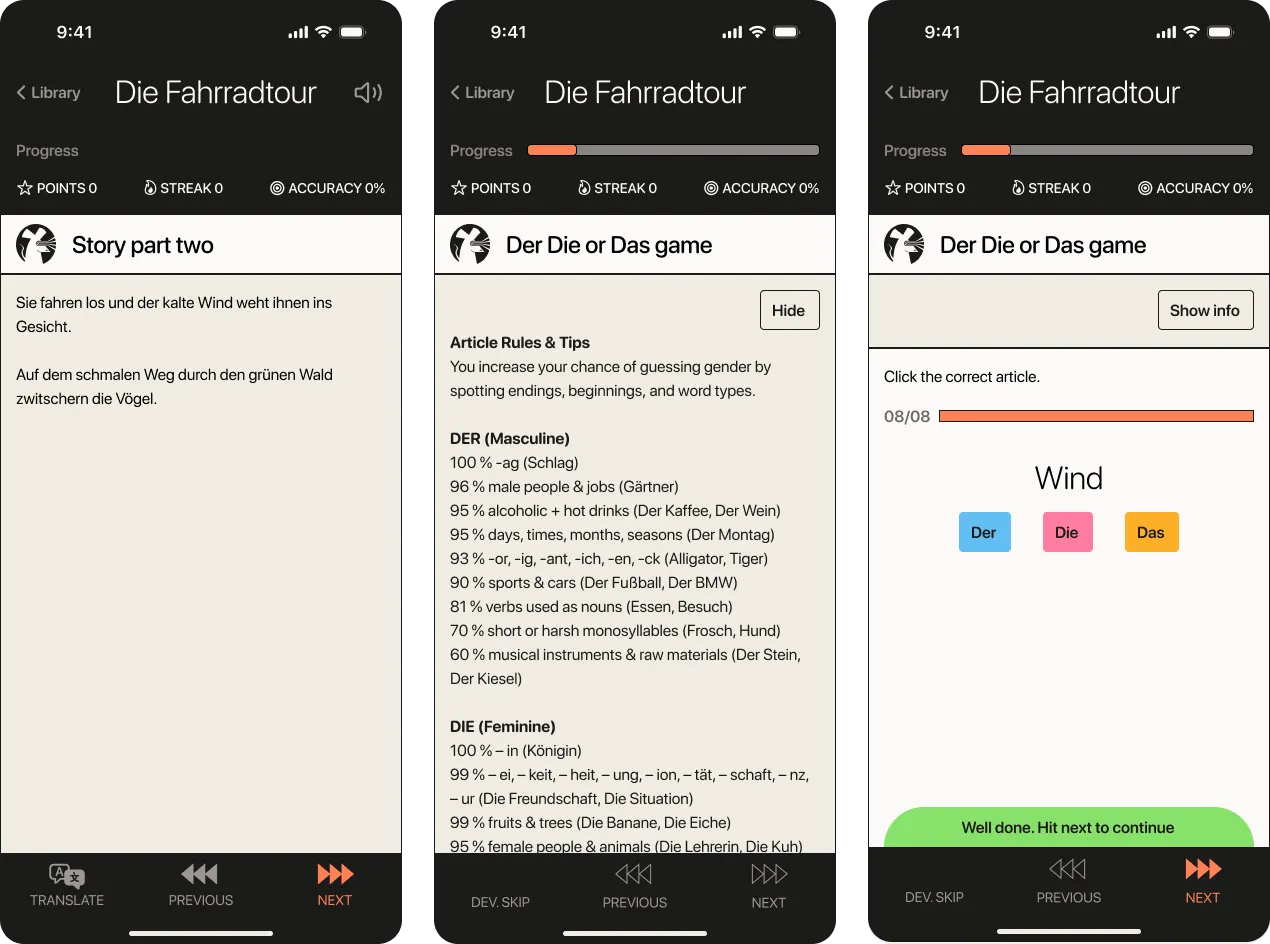

I used ChatGPT to write a short, but entertaining story with target language for A2-B1 learners in both German and English.
To match mental models of most learners, incorporate chunking and an increasingly challenging scaffold, I used the story format used by Duolingo (story lines, quiz, more lines, quiz etc).
Other decisions included:
* Adding feedback messages for correct/incorrect choices
* Reveal/hide grammar rules content
* Progress indicators to show where you are in the story and in the practice activity

For a fast Lean approach, I iterated on low-fidelity content and structure first until it was validated enough to create a design system.
To build a working prototype ready for user testing that could load the different stages with interactive games, progress tracking, score stats and more, I used to LLMs like ChatGPT to code it.
It was an intuitive, iterative process that easily allowed me to track the code being produced and make my own edits to the HTML and CSS to save time during each iteration.
After identifying key learner actions, I collaborated with the SME to develop a realistic story centred on two friends on a bike ride, providing natural language and structured progression.
Grammar explanations were kept brief, focusing on actionable patterns followed by immediate practice, with retry-based feedback and light gamification to sustain engagement.
AI tools were used to draft the story and extract supporting learning materials for prototyping.
Prototyping & User Feedback
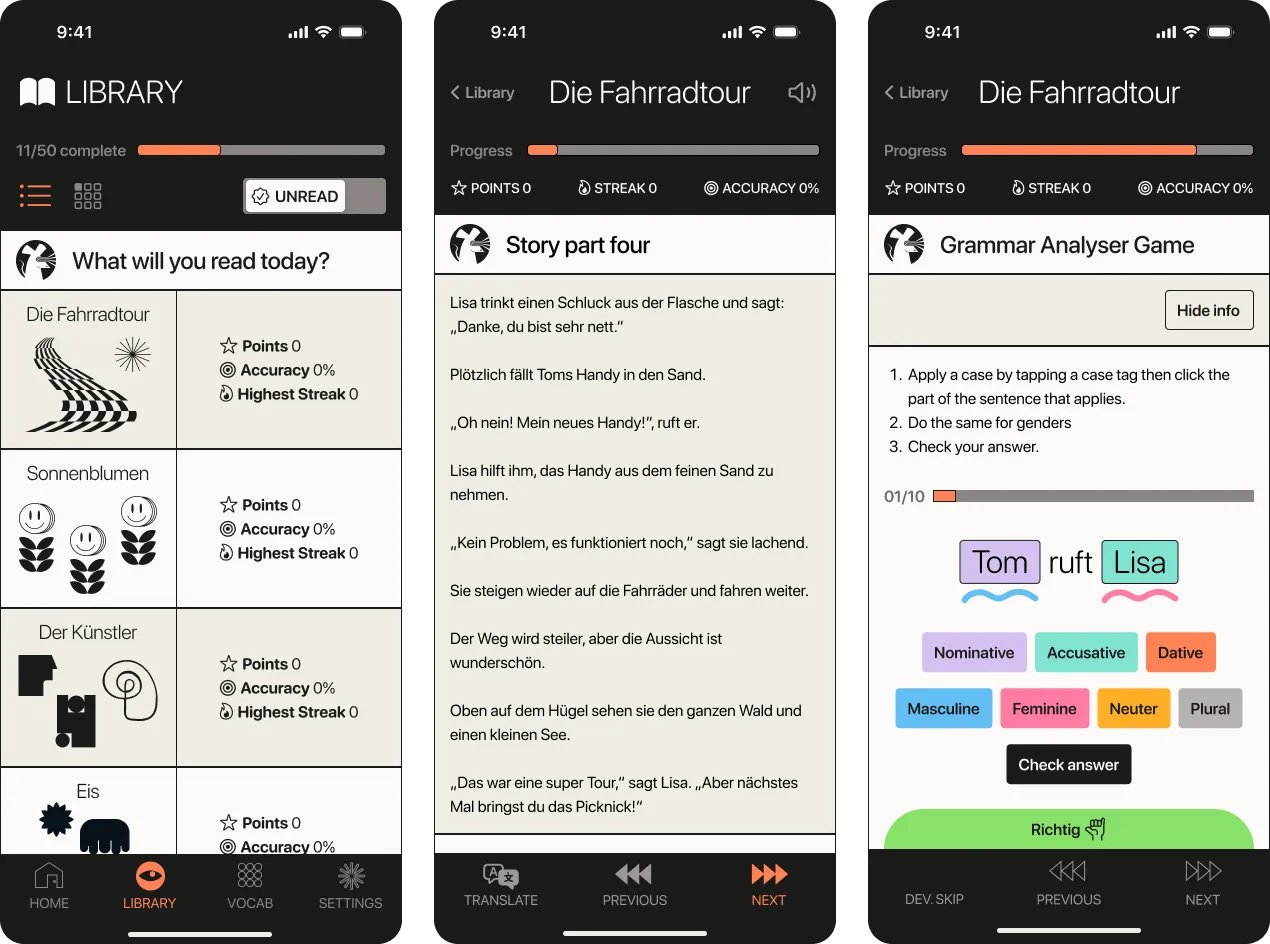
Once the text-based storyboard was complete and approved by the SME, I developed an interactive prototype on ChatGPT to test the basic concept and interactions. This pathed the way for designing screens on Figma, which were then brought to life in Figma Make.
Voices from user testing
I did user testing of the v1 prototype with five German learners in the A2-B1 level range to learn the following:
* Is it intuitive to play?
* Did participants learn anything?
* How can it be improved?
Learned new vocab and grammar → valid approach
“I learnt some good rules for applying male, female and neutral in part 2.”
Getting stuck and misclicks → unclear instructions
“I struggled with the last section in terms of controlling the buttons and knowing what to do.”
No sounds → not enough emotional reaction
“Add sound so the user can listen to the story.”
Minor inconsistencies → edit in the next iteration
“I'm not sure if they are grey on purpose.”
Changes for v2
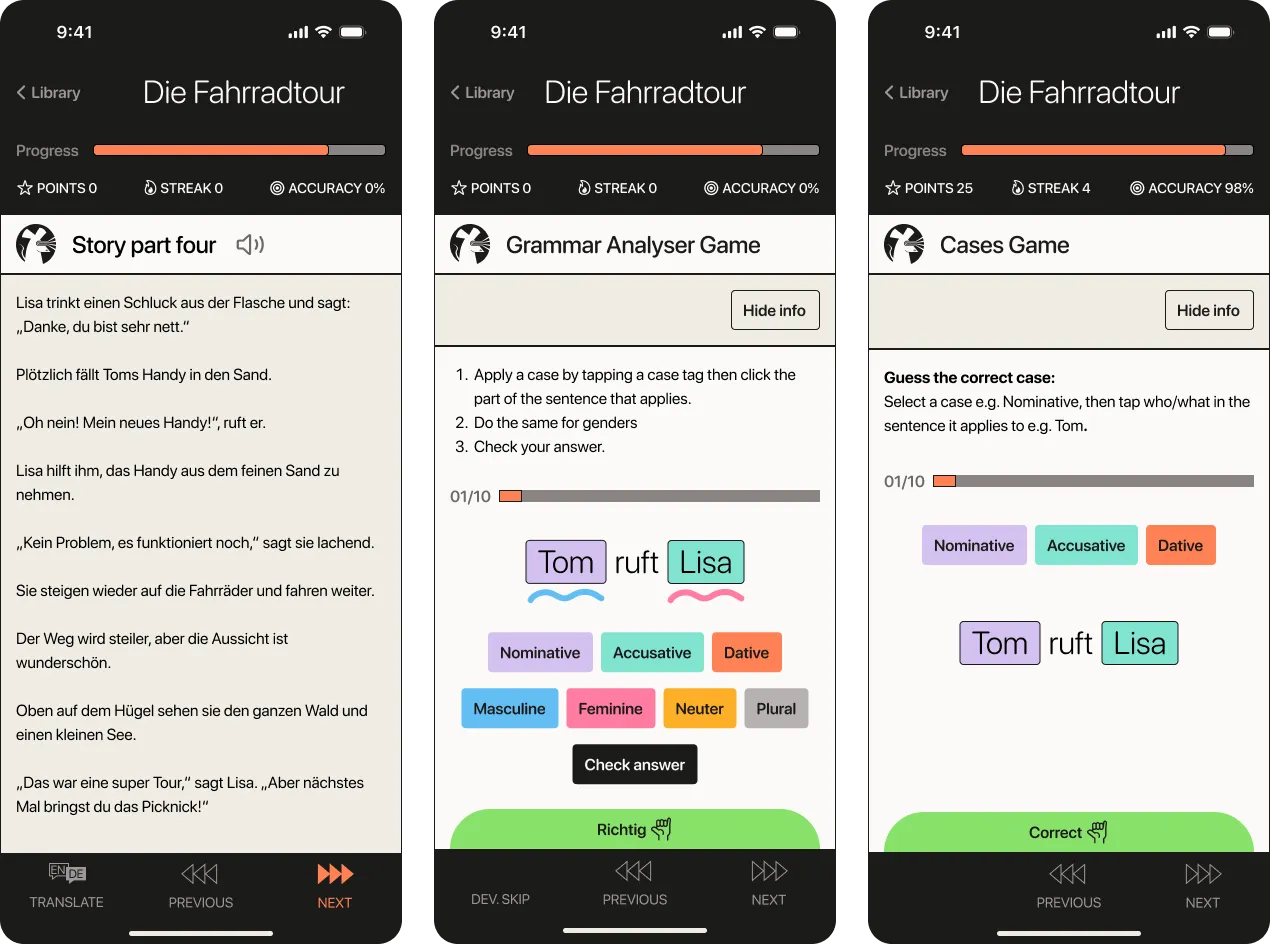
v2 Responding to user feedback
* Simplified the cases game to focus on just identifying cases
* Added a basic API to allow a read aloud function in story sections
* Added correct, try again and game complete sound affects for more emotional engagement
* Edited some game instructions and grammar info copy for more clarity
Results & Takeaways
To take this project further I would create a series of 10 stories and have learners go through one story a day for two weeks and evaluate progress using Kirkpatrick’s Model. This would involve several steps:
* Gauge learner satisfaction through post-training surveys or feedback forms.
* Assess knowledge acquisition by administering post-tests or quizzes on course content.
* Evaluate how effectively learners apply the new techniques to new language through observations from the SME.
* Measure the training’s impact on organisational performance by comparing end of year tests with previous years.
User testing showed a very positive reaction to the demo with all testers revealing that they learned new vocab and grammar rules.
Going forward I will use the same sequence of learning points, but spread them across 5 stories ending with a sentence analysis task and a writing task to test their comprehension and sentence production skills. Learner feedback and gamification will continue to reward speed over accuracy.
